I tried to build the Netgen from source with USE_SUPERBUILD off in cmake gui. Already downloaded the other parts, cgns_win64, occ75_win64, tcltk_win64, zlib_win64 from the git. When the project nglib try to read the function “NGCORE_API TBitArray& Or (const TBitArray& ba2)” in bitarray.hpp, there will be an error LNK2001.
The error is "unresolved external symbol “__declspec(dllimport) public: class ngcore::TBitArray & __cdecl ngcore::TBitArray::Or(class ngcore::TBitArray const &)” (_imp?Or@ $TBitArray@VPointIndex@netgen@@@ngcorenngcorenngcorenngcoren@QEAAAEAV12@QEAAAEAV@QEAAAEAV122@AEBV12re**@@QEAAAEAV12@AEBV12@@Z).** "
If you have any ideas, please let me know. Thanks.
I want to run meshing in Visual studio as simple as possible, only contain the ngcore and nglib, without python and ngsolve.
With the help of Chatgpt, I tried
(1) to change the ngcore and nglib from shared to static, set the DLL_HEADER to empty.
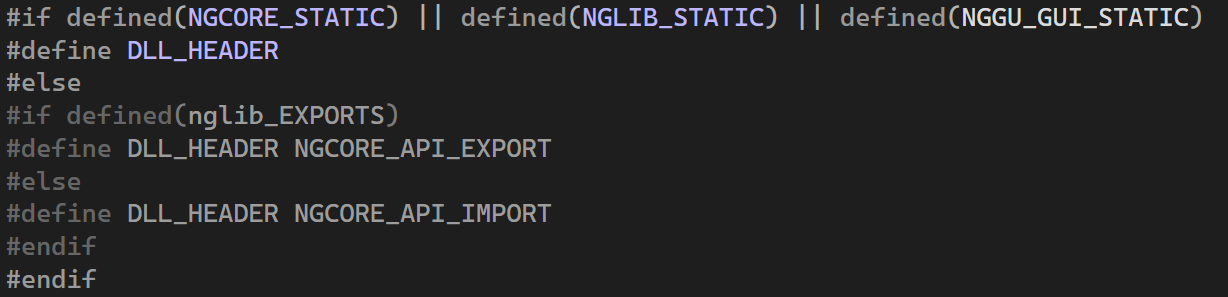
(2) to turn the use_python off, delete the anyflags in function Flags:: DoArchive.

Build success.
But when test with a small case, there are errors.
I’m also trying to build netgen/ngsolve from the sources on Windows, but I am only able to build the commit with the tag v6.2.2501 which is over a year old. Will a new release come soon which is tested and will build?
I found some time to sort out what was wrong with the Windows build. In a nutshell, the only problem which is not specific to my environment was a bug with intrinsics, here is the patch:
This is in the netgen repository under external_dependencies:
diff --git a/libsrc/core/simd_avx512.hpp b/libsrc/core/simd_avx512.hpp
index 8a07fe4d..d5dc5d1b 100644
— a/libsrc/core/simd_avx512.hpp
+++ b/libsrc/core/simd_avx512.hpp
@@ -121,8 +121,8 @@ namespace ngcore
template
void SIMD_function (const Function & func, std::true_type)
{
-
data = (__m512d){ func(7), func(6), func(5), func(4), -
func(3), func(2), func(1), func(0) }; -
data = _mm512_set_pd(func(7), func(6), func(5), func(4), -
func(3), func(2), func(1), func(0) );}
// not a function
I also had trouble with pybind11. As it turns out I had a copy of pybind11 installed with vcpkg which was being selected instead of the default. Uninstalling the vcpkg pybind11 solved the problem.
netgen.exe launches, but issues some warnings:
Including OpenCascade geometry kernel
optfile ./ng.opt does not exist - using default values
togl-version : 2
OCC module loaded
loading ngsolve library
NGSolve-6.2.2604-9-g905958888
Using Lapack
Including sparse direct solver UMFPACK
Running parallel using 16 thread(s)
Traceback (most recent call last):
File “”, line 1, in
ModuleNotFoundError: No module named ‘ngsolve’
Traceback (most recent call last):
File “”, line 1, in
ModuleNotFoundError: No module named ‘ngsolve’
Traceback (most recent call last):
File “”, line 1, in
ModuleNotFoundError: No module named ‘netgen’
I am assuming these are python modules otherwise it likely would not even run.
Also, I had to give -DBUILD_OCC=ON to the first cmake command. It previous tests, it built with pythonocc (7.9.3) installed via conda, but I would rather use OCCT 8.1. For my uses I just need to try -DBUILD_SHARED_LIBS=ON and see if I can get all the DLLs out of OCCT. Pointing the cmake config towards an opencascade built from the opencascade repo did not work. It could not find certain .cmake files from the opencascade install directory, even though they were actually present. So I either have to use the pythonocc distro, or let ngsolve build opencascade for me (or find out what is wrong with pointing ngsolve toward your own built opencascade).
I wish the build instructions on the ngsolve website explained about avoiding problems with the wrong python or the wrong pybind11, and I wish there was an email I could have sent a message to regarding the intrinsics syntax error. It would make onboarding with netgen/ngsolve a simpler process. But hopefully this message helps the next person.