NGSolve Periodic Boundary Condition Regression Bug Report
Forum Post Title
Periodic boundary conditions broken with OCC geometry Identify() in version 6.2.2406 and later
Summary
A regression bug has been discovered in NGSolve version 6.2.2406 and all subsequent versions (up to 6.2.2506 as of November 2025) where the Identify() method for periodic boundary conditions with OCC geometry no longer works correctly. The identification information is lost during mesh generation when using Glue(), resulting in zero identifications and no periodic boundary conditions being applied.
Problem Description
When using Identify() on OCC geometry faces combined with Glue(), the identification information is lost during mesh generation. This affects code that previously worked correctly in versions 6.2.2404 and 6.2.2405.
Symptoms
mesh.ngmesh.GetIdentifications()returns an empty list (0 identifications)- Periodic boundary conditions are not applied
- No error messages are generated
- Mesh generation completes successfully but without periodic identification
Code to Reproduce
from ngsolve import *
from netgen.occ import *
from netgen.meshing import MeshingParameters

iron = Box((0,0,0),(1,1,1))
iron.name = "iron"
iron.maxh = 0.2
internal_domain = Sphere(Pnt(0,0,0.0), r=2)*Box((0,0,0), (5,5,5))
internal_domain.name = "air"
internal_domain.maxh = 1.0
internal_domain.faces.Min(Z).name = "gnd"
internal_domain.faces[0].name = "outer"

external_domain = Sphere(Pnt(3,0,0.0), r=2)*Box((3,0,0), (3+5,5,5))
external_domain.name = "air"
external_domain.maxh = 1.0
external_domain.faces.Min(Z).name = "gnd"
external_domain.faces[0].name = "outer"

# Set periodic identification
external_domain.faces[0].Identify(internal_domain.faces[0], "id")
domain = Glue([iron, internal_domain, external_domain])

geo = OCCGeometry(domain, dim=3)
mp = MeshingParameters(maxh=20.0, segmentsperedge=1, grading=0.7)
mesh = Mesh(geo.GenerateMesh(mp)).Curve(2)

# Check identifications
identifications = mesh.ngmesh.GetIdentifications()
print(f"Number of identifications: {len(identifications)}")  # 6.2.2406+: 0
Version Comparison Results
Tested Versions
| Version | Identifications | Status | Notes |
|---|---|---|---|
| 6.2.2404 | 20 pairs | ✓ Working | Verified working |
| 6.2.2405 | 20 pairs | ✓ Working | Recommended version |
| 6.2.2406 | 0 pairs | ✗ Broken | Bug introduced |
| 6.2.2501 | 0 pairs | ✗ Broken | |
| 6.2.2502 | 0 pairs | ✗ Broken | |
| 6.2.2503 | 0 pairs | ✗ Broken | |
| 6.2.2504 | 0 pairs | ✗ Broken | |
| 6.2.2505 | 0 pairs | ✗ Broken | |
| 6.2.2506 | 0 pairs | ✗ Broken | Latest as of Nov 2025 |
Working Versions (6.2.2404, 6.2.2405) Output
Number of identifications: 20
[(3.0, 2.0, 0.0), (0.0, 2.0, 0.0)]
[(3.0, 0.0, 2.0), (1.2246467991473532e-16, -2.999519565323715e-32, 2.0)]
[(5.0, -2.4492935982947064e-16, 8.057930683288193e-14), (2.0, -2.4492935982947064e-16, 8.057930683288193e-14)]
[(3.0, 1.868120247864882, 0.7142315727530197), (0.0, 1.868120247864882, 0.7142315727530197)]
[(3.0, 1.4142121958551752, 1.4142149288896946), (0.0, 1.4142121958551752, 1.4142149288896946)]
[(3.0, 0.714227962521057, 1.868121628147648), (0.0, 0.714227962521057, 1.868121628147648)]
...(total 20 pairs)...
Broken Versions (6.2.2406+) Output
Number of identifications: 0

✗ No identifications found
Visual Comparison
Version 6.2.2404 - Working ✓
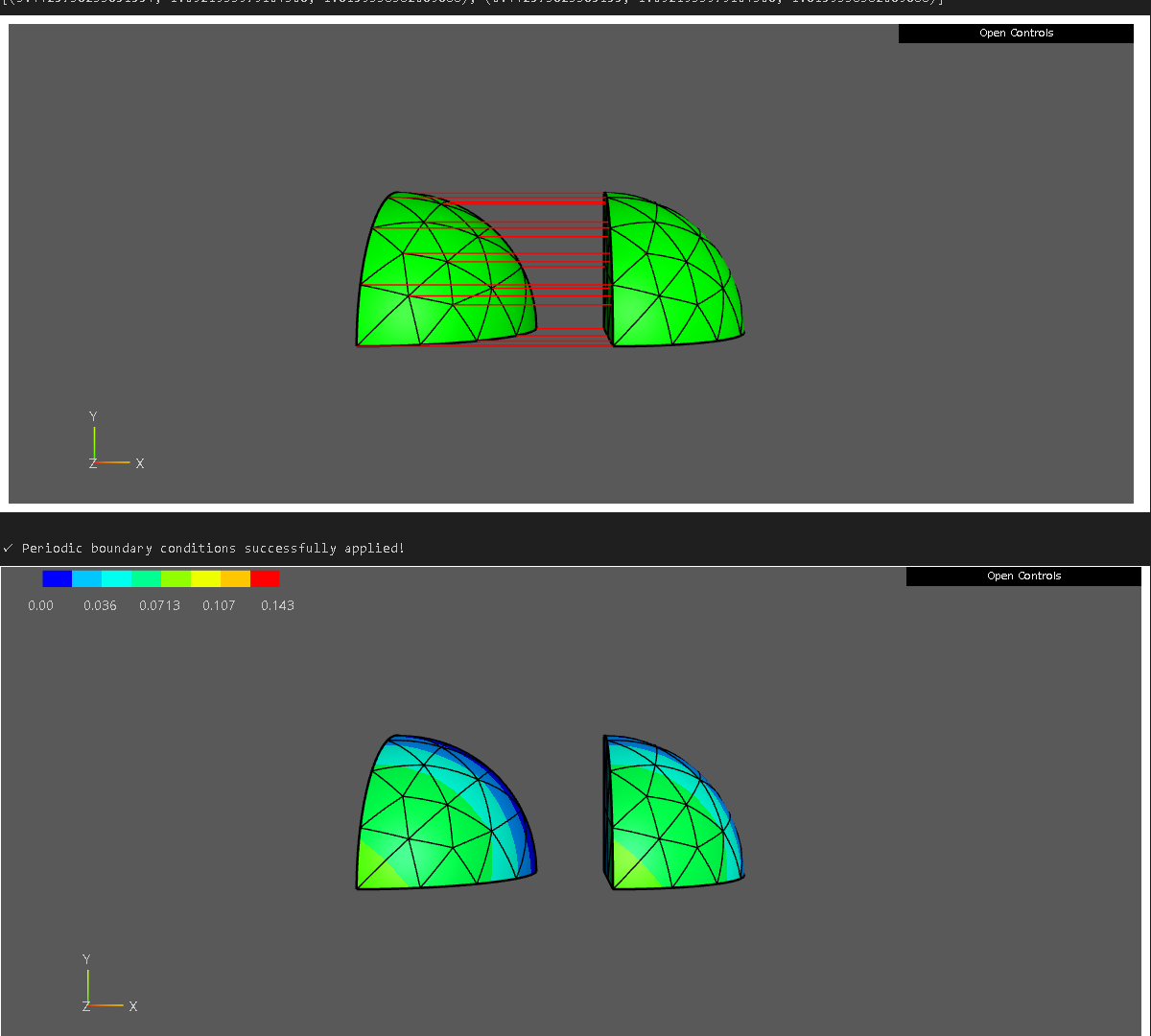
Figure 1: NGSolve 6.2.2404 with periodic boundary conditions correctly applied. Red lines show identified point pairs where periodic boundary conditions are enforced.
In the working versions above, the two spherical regions’ boundary surfaces (outer) are correctly identified. The corresponding points on the left and right regions are connected by red lines, indicating where periodic boundary conditions are applied.
Version 6.2.2406 - Broken ✗
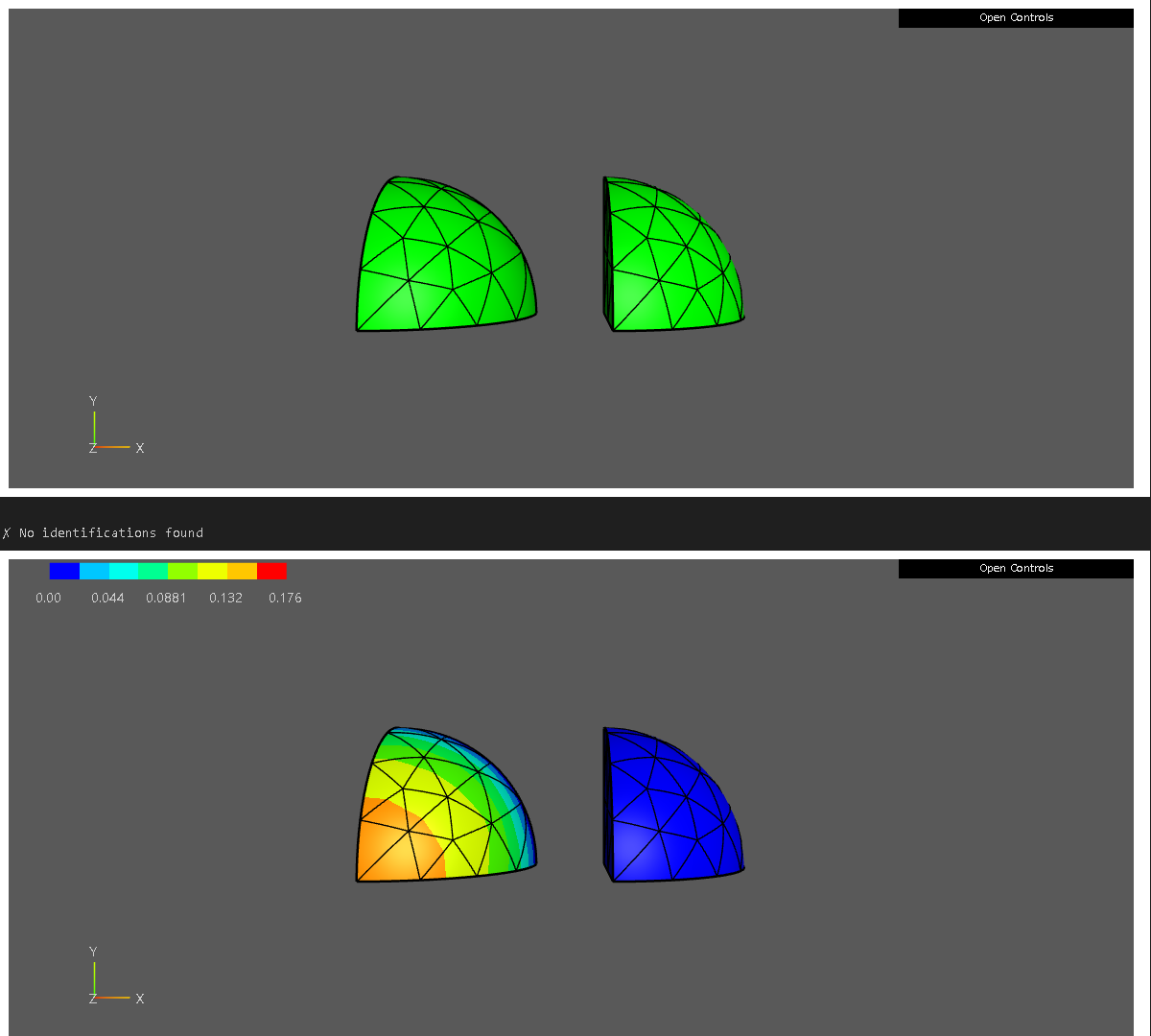
Figure 3: NGSolve 6.2.2406 - No identification lines visible, periodic boundary conditions not applied.
In version 6.2.2406 and later, no red identification lines are displayed, confirming that the identification information has been lost and periodic boundary conditions are not applied.
Suspected Cause
The regression appears to be related to changes in either the Glue() method or the Identify() method between versions 6.2.2405 and 6.2.2406. The identification information set before Glue() is being discarded during the geometry merging process.
Possible causes:
Glue()may be removing identification information during geometry processing- The faces may have incompatible topology after boolean operations (sphere intersections)
- OCC geometry identification may not work correctly with complex boolean operations in newer versions
Workaround
Recommended: Downgrade to 6.2.2405
pip install --force-reinstall ngsolve==6.2.2405
Important: After installation, restart your Jupyter kernel if using Jupyter Notebook.
Alternative Approaches (if downgrade is not possible)
-
Use CSG Geometry instead of OCC
- CSG geometry with
PeriodicSurfaces()method is more reliable - However, this provides less geometric flexibility
- CSG geometry with
-
Use simpler geometries
- Avoid complex boolean operations (sphere intersections)
- Simple box geometries may work
Environment
- OS: Windows
- Python: 3.12
- NGSolve: 6.2.2404-6.2.2506 tested
- netgen-mesher: Corresponding versions
- Verification Date: November 24, 2025
Request for Development Team
Could the development team please investigate this regression? This is a breaking change that affects existing code using periodic boundary conditions with OCC geometry.
Key questions:
- What changed in version 6.2.2406 regarding
Glue()orIdentify()methods? - Is this an intended behavior change or a bug?
- Is there a new recommended approach for periodic boundary conditions with OCC geometry?
Thank you for your excellent work on NGSolve!
Additional Resources
Visualization Export Methods
For saving visualizations from NGSolve webgui:
Method 1: VTK Export (Recommended)
from ngsolve import VTKOutput

vtk = VTKOutput(ma=mesh, coefs=[gfu], names=["solution"], filename="output", subdivision=2)
vtk.Do()
# Open in ParaView for high-quality image export
# ParaView: https://www.paraview.org/download/
Method 2: OS Screenshot Tool
- Windows:
Win + Shift + Sto capture WebGuiWidget display - Note: WebGL canvas auto-capture via JavaScript is restricted
References
End of Report